

The best web scraping tools: a smart buyer's guide

You need data, but it's stuck inside a webpage without an export button or an API. Fortunately, there are dozens of tools that can solve this sticky problem. So which one should you choose?
The best tool for the job depends on two things: the format you want the data in, and how much setup you're happy to do. If you're a developer adding scraping to an agentic workflow, a single URL in your code that returns fresh HTML may be the solution. If you're a marketer or analyst, you may prefer a Google Sheet whose rows update on a schedule.
This guide sorts nine tools by those two questions. For each one, you'll see what it does, who it suits, what it costs each month, and how much setup stands between you and your first row of data.
Which tool fits your situation
- You have a webpage or list of URLs, and want the data in a spreadsheet, without code: Simplescraper, Browse AI, Thunderbit, or Octoparse.
- You are a developer feeding pages into an LLM or RAG pipeline: Firecrawl.
- You are a developer scraping static sites or running large-scale crawls: Scrapy, optionally with a headless browser for pages that need a real browser.
- Your target already has a ready-made scraper someone else maintains: Apify.
- You are being blocked and the real problem is proxies: Bright Data.
- You want a zero-configuration API for articles, products, and profiles at enterprise volume: Diffbot.
The four criteria we judged each tool on
We assessed each tool using its public documentation, pricing pages, and published reviews, looking at four criteria:
- Reliable data in the right format: whether the tool gives you usable data in the format you need (spreadsheets, JSON, markdown, or a connected app) and holds up on real pages.
- Fit for your workflow: whether it matches how you actually work, from a no-code browser extension or dashboard to an API endpoint, code framework, or managed platform.
- Real cost: what you actually pay once free-tier limits, row or credit rules, proxy tiers, and plan-gated features kick in, not just the starting price.
- The friction factor: how complicated a tool is, and how many steps sit between you and the data.
Friction is the easiest factor to miss in a feature table. Every tool has some learning curve. The best ones are gentle rather than vertical. A few examples of what that looks like in practice:
- Pages of documentation to read before the first row of data.
- Product-specific vocabulary you have to learn to navigate the product.
- An app to download and install before you can scrape anything.
- Screens of settings and parameters to configure per job.
- Credit multipliers and fine print in pricing, where one kind of page quietly costs two or three times another.
Simplescraper is our product; we measure it using the same criteria.
Nine tools compared: free tier and monthly price
| Tool | Best for | Free tier | Paid from |
|---|---|---|---|
| Simplescraper | No-code scraping with scheduling, monitoring, screenshots, APIs, and AI columns | 100 credits on signup; unlimited 5-page runs free in the browser | $39/mo (6,000 credits) |
| Browse AI | No-code teams who want an AI agent to build the dataset | 50 credits/month | $48/mo (2,000 credits) |
| Octoparse | Non-technical users on moderately complex sites | 2,000 rows/month | $19/mo (10,000 rows) |
| Thunderbit | Quick one-off grabs from a page into a spreadsheet | 6 pages/month | $15/mo (500 credits) |
| Firecrawl | Developers building LLM pipelines and RAG | 1,000 credits/month | $19/mo (5,000 credits) |
| Scrapy | Developers running static or large-scale crawls | Free, open source | Free |
| Apify | Teams whose target already has a maintained Actor | $5 of credits/month | $19/mo |
| Bright Data | Teams whose bottleneck is blocking and proxy scale | 5,000 records/month | $1.50 per 1,000 records |
| Diffbot | Enterprise, high-volume article/product/profile extraction | 10,000 credits/month | $299/mo (250,000 credits) |
Prices are for monthly billing, from each vendor's public pricing page as of November 2026.
Not all credits are created equal
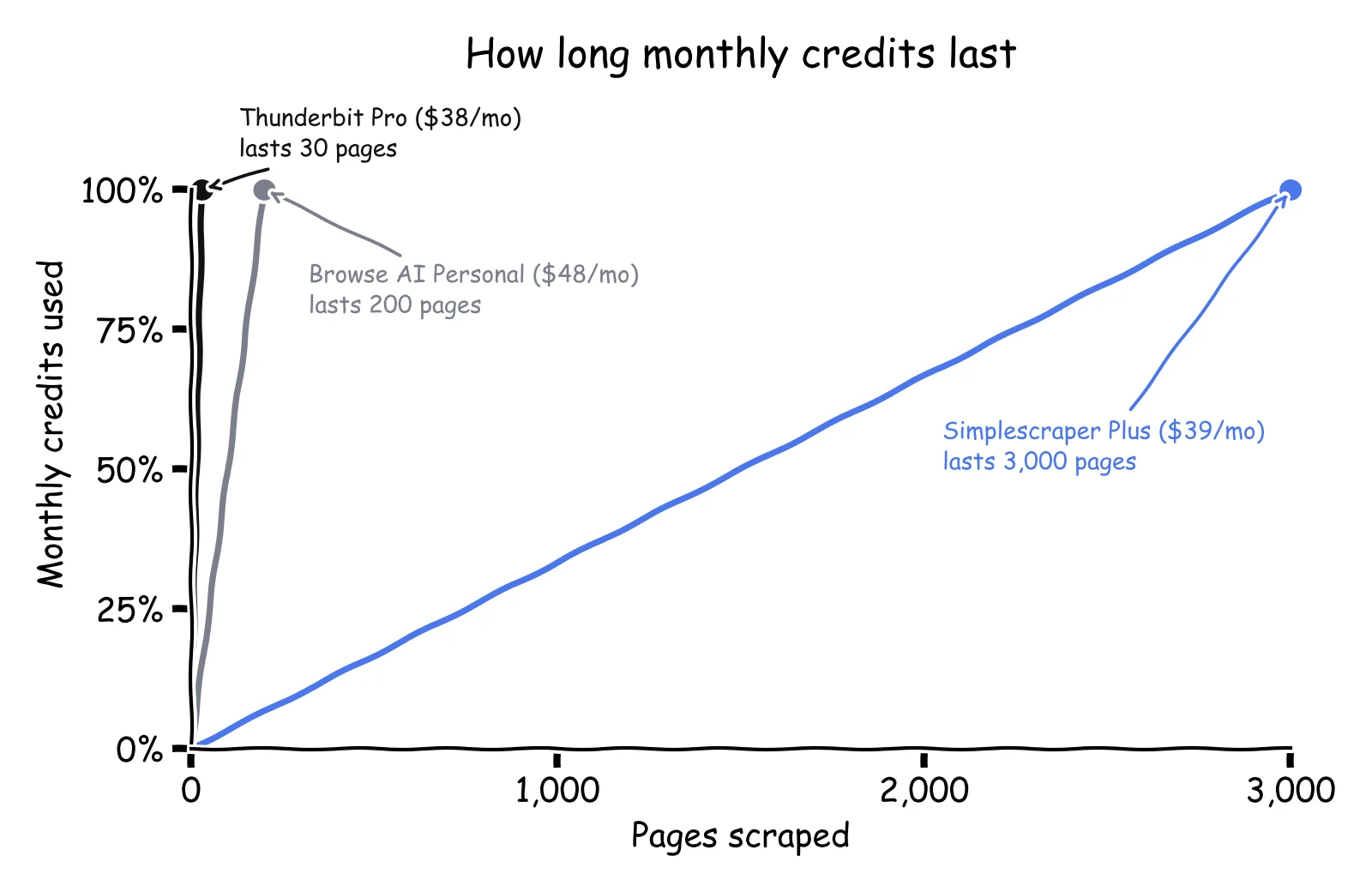
Some scraping tools charge for every page scraped, others for every row returned. So per-row charges vary depending on whether the page has 10, 100 or 1,000 rows. As the table below shows, the same scrape can cost very different amounts depending on the pricing model.
Browse AI, Thunderbit and Octoparse's Basic plan charge per row; Simplescraper charges per page.
| Tool | Charges | Entry plan | Pages covered | Cost per page |
|---|---|---|---|---|
| Simplescraper | 2 credits a page | Plus $39/mo (6,000 credits) | 3,000 | about 1.3¢ |
| Browse AI | 1 credit per 10 rows | Personal $48/mo (2,000 credits) | 200 | 24¢ |
| Octoparse | Per row on Basic only | Basic $19/mo (10,000 rows) | 100 | 19¢ |
| Thunderbit | 1 credit a row | Pro $38/mo (3,000 credits) | 30 | about $1.27 |
| Bright Data | $1.50 per 1,000 records | Pay as you go | N/A | 15¢ |
Here's a visual of how many pages can be scraped on each product's monthly plan, assuming 100 rows per page.
The three families of scraping tool
There are broadly three families of web scraping tool, and most of the confusion in buyer's guides comes from comparing them as if they were the same thing.
No-code tools (Simplescraper, Browse AI, Octoparse, Thunderbit) live in a browser extension, a web dashboard, or both. You open the page, click the fields you want, and the tool remembers the pattern. As the name suggests, there's no wrangling with code - everything's done in the UI (or increasingly, via MCP, which lets you connect and run a scraper directly from an AI assistant like Claude or ChatGPT).
The best products offer scheduling, change monitoring, pagination, logins, and integrations to Google Sheets, Airtable, Zapier, and webhooks. They suit marketers, ops teams, founders, and anyone who thinks in spreadsheets, not API endpoints.
If you find yourself copying and pasting from a webpage or posting a job on Upwork to have someone scrape a site for you, one of these tools is probably what you're looking for.
Developer libraries and APIs (Firecrawl, Scrapy) work in code. You write a script, run it, and own the pipeline. Open-source libraries like Scrapy are free and powerful. But you have to host and run them yourself, and handle the proxy rotation, retries, and parsing. AI-native APIs like Firecrawl aim to hide most of that behind a single endpoint, usually returning clean markdown or JSON for an LLM.
Managed platforms and proxy networks (Apify, Bright Data, Diffbot) sit a layer above the other two families. You pay someone else to run browsers, rotate IPs, bypass anti-bot stacks, or maintain pre-built scrapers for well-known sites. They cost more per request, but they also take the maintenance burden off your team.
The nine scraping tools in detail
Simplescraper
What it does. Simplescraper turns a website into structured data through a Chrome extension and a dashboard. It runs in the browser, or in the cloud on a schedule. It can bulk scrape thousands of pages concurrently, and has built-in databases so you can build datasets from target sites. It can also watch pages for changes and send results to Google Sheets, webhooks, an API, or an AI assistant such as Claude.
Who it suits. Non-developers who want more than a single-page grab: recurring scrapes, change monitoring, APIs, bulk runs, and AI enrichment, without writing code. Developers also use the API for quick extraction tasks they don't want to build from scratch.
Things to consider. JavaScript-heavy pages use 2 credits instead of 1.
Friction. Low. You either click fields in a browser extension or describe them in plain words, and the pricing is one or two credits a page with no extra charge for proxies or locations.
What it costs. Browser runs of up to 5 pages are free, no account needed. New accounts get 100 credits. Plus starts at $39/mo for 6,000 credits, and plans go up to Scale with 100,000 credits.
Browse AI
What it does. Browse AI points an AI agent at a URL, reads the page, proposes a dataset, and lets you approve it. From there it runs on demand, on a schedule, or across thousands of pages, with change monitoring and integrations to spreadsheets, APIs, and connected apps.
Who it suits. No-code teams who want the tool to guess the dataset rather than click each field themselves, and who care about ongoing monitoring as much as one-off extraction.
Things to consider. Browse AI charges by the row on list pages, one credit for every ten rows, so a page with 500 rows costs you 50 credits even though it's a single page. A lot of the useful stuff, like integrations, is locked behind Premium at $500 a month. Personal also caps you at 10 domains, and each extra domain costs $5 a month. For a power user, it's expensive.
Friction. Medium. Browse AI has its own vocabulary to learn, and working out what a job will cost takes some arithmetic: a task costs at least 1 credit (2 to 10 on premium sites), every 10 rows cost 1, a screenshot costs 1, each monitoring check costs 1, and building a robot with AI costs 20 once your plan's allowance is used up.
What it costs. Free plan with 50 credits per month. Personal is $48/mo for 2,000 credits a month, or $19/mo billed yearly.
Octoparse
What it does. Octoparse is a visual point-and-click builder with cloud scheduling and templates for common sites. It has been in this category longer than most of the AI-native tools.
Who it suits. Non-technical business users on moderately complex sites, especially where a pre-built template already exists.
Things to consider. Paid plans start in line with other no-code tools at $19/mo, but that entry tier excludes scheduled runs, concurrent runs, CAPTCHA solving, the Zapier integration, export to cloud, and incremental extraction, so any recurring or automated job pushes you onto a higher plan.
Friction. High. Before you can scrape anything you have to download and install a desktop tool, which rules out anyone who wants to open a page and get data in the same browser session.
What it costs. Free plan with 2,000 rows a month. Basic is $19/mo for 10,000 rows (not pages) a month, without cloud or scheduled runs; Standard, which adds them, starts at $83/mo.
Thunderbit
What it does. Thunderbit is a Chrome extension that aims to be the shortest path from an open page to a spreadsheet. You open the page, click the extension, it suggests fields, you approve them, and the rows land in Excel, Google Sheets, Airtable, or Notion. Paid plans add pagination, subpage scraping, and a handful of scheduled scrapers.
Who it suits. Sales, ops, and research users who want one page in a spreadsheet in seconds, and anyone testing whether a dedicated scraping tool is worth paying for before they commit.
Things to consider. The free plan is 6 pages a month, which is a demo rather than a working tier. Scheduling is capped by plan, and living inside a browser extension limits what it can do once you move past one-off grabs.
Friction. Low for a single page: click the extension, approve the fields, export. Scheduling, bulk runs, and heavier automation sit on higher tiers, so recurring work pushes you up the pricing ladder faster than its headline price suggests.
What it costs. Free: 6 pages a month. Starter is $15/mo for 500 credits a month and up to 5 scheduled scrapers. Pro is $38/mo for 3,000 credits a month, unlimited scrapers, and 25 scheduled scrapers. Billed yearly, they come to $9 and $16.50 a month. Business is custom.
Firecrawl
What it does. Firecrawl is an AI-native scraping API. Point /scrape at a URL and it returns clean markdown or structured JSON ready to feed into an LLM. Crawl, search, scrape, and interact all live behind one API.
Who it suits. Developers building RAG pipelines, agents, or LLM workflows who want markdown out of a URL with almost no configuration and a generous free tier to prototype on.
Things to consider. It is a developer tool. There is no visual builder, and heavily bot-protected or authenticated targets are not its strength.
Friction. Low for developers, impossible for non-developers. If you can hit an API and parse JSON, a single /scrape call returns markdown ready for an LLM. If you cannot, there is no UI to fall back on.
What it costs. Free tier with 1,000 credits per month; the Hobby plan is $19/mo for 5,000 credits.
Scrapy
What it does. Scrapy is the long-standing Python framework for building crawlers. It handles concurrency, retries, pipelines, and CSS/XPath selectors, and there is a mature ecosystem around it for proxies, headless browsers, and hosted deployment.
Who it suits. Python developers scraping at scale, especially where you want full control over concurrency, deduplication, and pipeline logic. It is still the default answer when a team says "we'll build it ourselves."
Things to consider. You own everything: proxies, anti-bot handling, JavaScript rendering (usually by bolting on a headless browser), and the maintenance when sites change.
Friction. Very high. Every proxy, retry, render step, and schedule is yours to wire up and keep working.
What it costs. Free and open source. Your cost is engineering time and infrastructure.
Apify
What it does. Apify is a platform with a large marketplace of pre-built scrapers ("Actors") covering LinkedIn, Amazon, Instagram, Google Search, TikTok, real estate sites, marketplaces, and many long-tail targets, plus an open-source crawling framework (Crawlee) for building your own.
Who it suits. Teams whose target site already has a maintained Actor. If so, you can be pulling data in minutes without writing selectors.
Things to consider. Actors on obscure sites can be abandoned or buggy, and running compute on the Apify platform is more expensive than running the same job on your own cloud.
Friction. High unless a maintained Actor already covers your exact target. There is a lot of documentation to read, a lot of parameters per Actor, and the platform itself is complex to navigate. Pricing adds another layer: compute-unit pricing can scale nonlinearly at high volume, and once you leave the marketplace, you own the custom Actor code and its maintenance.
What it costs. Free plan with $5 of credits per month; the Starter plan is $19/mo.
Bright Data
What it does. Bright Data runs one of the largest commercial proxy networks, with a public claim of more than 72 million residential IPs across 195 countries, plus hosted scraping products on top (Web Unlocker, Scraping Browser, pre-built datasets).
Who it suits. Teams whose actual problem is proxy scale and geo diversity: large-scale price monitoring, ad verification, SERP collection, or anything where a single-IP scraper will not survive.
Things to consider. It is not a point-and-click tool, and pricing climbs quickly once you move from datacenter to residential or mobile proxies.
Friction. High. There is no point-and-click path, so every job starts in code, and pricing climbs steeply as you move between proxy tiers, which means a run that looked cheap at the datacenter rate can cost many times more on residential or mobile. Pricing is also layered across separate products (proxies, Web Unlocker, Scraping Browser, and SERP API) with no single plan that unlocks everything, and new users often hit account verification hurdles on sign-up.
What it costs. Its Web Scraper API is free for 5,000 records a month, then $1.50 per 1,000 records pay as you go, or $499/mo on the Scale plan. Proxies and the other products are priced separately.
Diffbot
What it does. Diffbot uses computer vision and NLP to classify any web page as an article, product, discussion, or profile and return structured JSON, with zero configuration per site.
Who it suits. Enterprise teams processing very large volumes of pages where writing or maintaining per-site scrapers is not feasible.
Things to consider. Expensive entry point, and its page-type-classifier approach is less flexible when your data does not fit one of its standard schemas.
Friction. Low if your pages fit one of the built-in types, higher if they do not. When they do, there is no per-site configuration at all. When they do not, for custom fields you use the Extract API or the Knowledge Graph, which moves the job from one zero-config endpoint to a second product you have to learn.
What it costs. Free plan with 10,000 credits per month; paid plans from $299/mo.
How to choose in four questions
1. How often do you scrape? Once is different from every day. For a one-off grab, a free tier of a no-code tool or an open-source library you already know is the cheapest answer. For anything recurring, pay for scheduling and change monitoring rather than reinventing them.
2. How many pages? On a per-page plan, a few thousand pages a month fits an entry plan at about $40/mo. On a per-row plan, the same pages can take a much bigger plan. Hundreds of thousands pushes you toward Apify-style platforms, Diffbot, or a self-hosted Scrapy fleet on top of Bright Data proxies.
3. Does the site block bots? If the page passes a curl test and the data is in the HTML, almost any tool will work. If it is behind Cloudflare, a CAPTCHA, or a login, you need a tool with real browser rendering, residential proxies, and stealth, such as Simplescraper, Browse AI, or Bright Data's unlocker, rather than a raw Python library.
4. Do you write code? If no, stay in the no-code lane: Simplescraper, Browse AI, Octoparse, or Thunderbit for a quick one-off grab. If yes, decide whether you want to own the pipeline (Scrapy), feed an LLM (Firecrawl), or hand off the hard parts (Apify, Bright Data).
Common questions about scraping tools
Are AI scrapers actually better? For extraction itself, usually not. CSS selectors give you the same result from the same page every time. They're usually faster and cheaper to run, too. AI helps around the extraction: fixing broken selectors, handling navigation, and summarizing what comes back.
Can I just use ChatGPT or Claude to scrape? For reading a single page you have already opened, sort of. You can paste HTML or use their browsing feature. For scraping dozens or thousands of pages, on a schedule, with pagination and logins, no. You need a real scraping tool. Several of the tools in this guide, Simplescraper included, send results into ChatGPT or Claude so you can combine the two.
What is the difference between a scraper and a crawler? A crawler follows links to discover pages. A scraper extracts data from pages it already has. Most real projects do both, and most tools in this guide handle both.
Try one on the page you care about
Pick the one in this guide that matches your situation, open its free tier, point it at the page you actually care about, and see what comes back.
Simplescraper aims to get the balance right: friendly for no-coders through its dashboard, with strong API and MCP support when you want to connect it to code or an AI assistant. Scraping is a means to an end; what you care about is the data. Simplescraper gets out of the way and makes extracting that data as simple as possible.